
Your Google Business Profile is the free listing that shows your business on Google Maps and in the map pack — the box of three businesses Google puts at the top of local searches. For a clinic, café, salon or service business in Saudi Arabia, that listing is often the first thing a customer sees, and many customers call or ask for directions straight from it without ever opening your website.
This guide explains how to optimise Google Business Profile properly, in the right order: claim it, complete every field honestly, and keep it accurate in Arabic and English. None of the steps cost money — only care, which is what separates the businesses in the map pack from the ones below them.
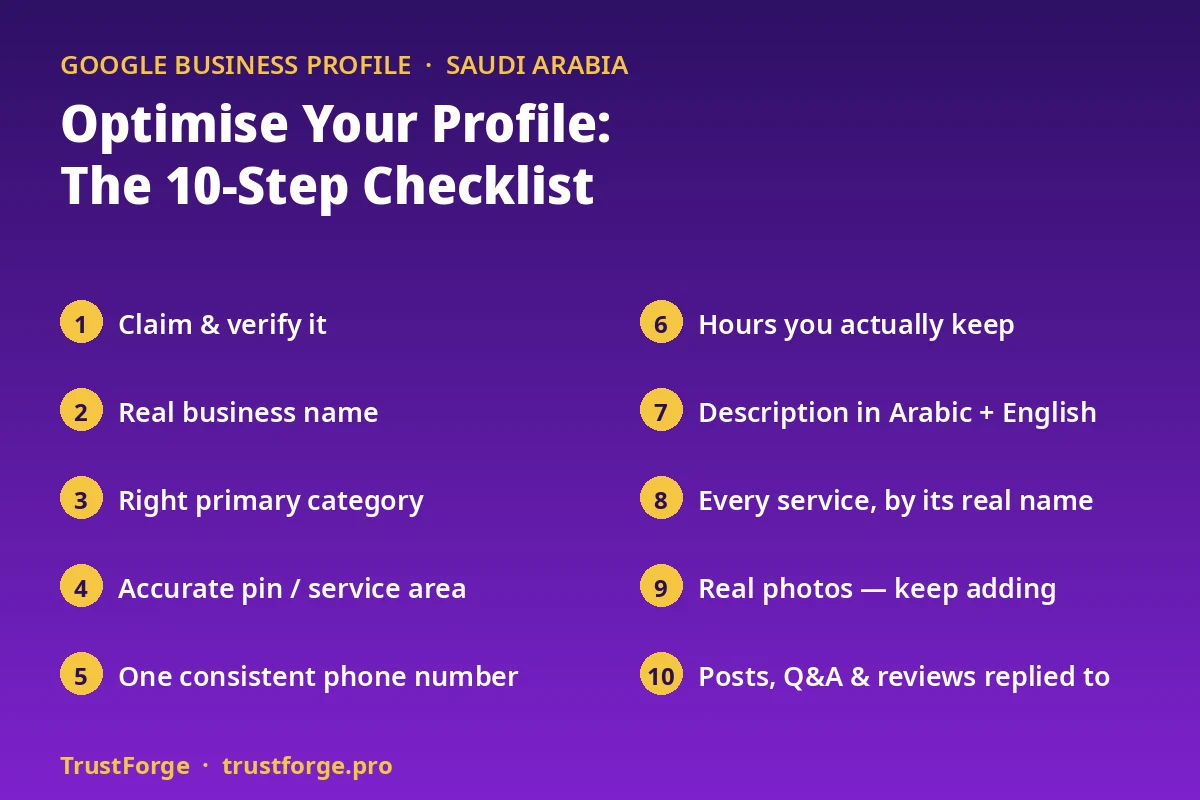
Step 1: Claim and verify your profile
Search for your business on Google Maps. If the listing exists but is not yours, you will see “Claim this business” or “Own this business?” — follow that process and complete Google’s verification. If your business is not listed at all, create the profile yourself at google.com/business rather than waiting for Google or a customer to add it.
Until a profile is claimed and verified, you cannot control its category, photos, hours or services, and anyone can suggest edits to it. An unclaimed profile is the single most common problem we find in Saudi listings — and the easiest one to fix. Do this step first; everything below depends on it.
Step 2: Get your business name right
Use your real business name — the name on your signboard and your commercial registration. Do not add keywords, city names or offers to the name field (“Best Dental Clinic Riyadh — Teeth Whitening and Implants”). Google can penalise names that do not match the real-world sign, and a stuffed name also looks untrustworthy to customers who then see a different name on your building.
If customers know you by both an Arabic and an English name, make sure both forms are the genuine name of the business, not two different descriptions of it. Consistency matters more than cleverness: the same name should appear on your website, your signboard and your social accounts.
Step 3: Choose the right primary category
Your primary category is one of the strongest signals telling Google what searches your business should appear for. Choose the category that describes your business as a whole, not your most profitable service. A dental clinic is a “Dental clinic” first; implants and orthodontics belong in the services list and in additional categories where they genuinely apply.
Then add every additional category that is truly true for your business — no more, no fewer. Categories you do not actually offer bring wasted calls, and customers who arrive expecting a service you do not provide leave disappointed — sometimes in a review.
Step 4: Set your address — or your service area — correctly
If customers visit you at a physical location, add the full, correct address and check the map pin with your own eyes. In newer Saudi districts and malls, an auto-placed pin can sit on the wrong street or the wrong entrance; a customer following directions to the wrong point blames your business, not Google. Move the pin to your actual entrance.
If you visit customers instead — cleaning, maintenance, home services — hide your address and set service areas instead, naming only the cities and districts you genuinely cover. Listing areas you cannot reach in reasonable time produces enquiries you cannot serve.
Step 5: Add one consistent phone number — and WhatsApp
Add the phone number customers should actually call, and check that the same number appears on your website and social profiles. Inconsistent numbers across the web weaken Google’s confidence that all those listings are one business, and they confuse customers about which number works.
In Saudi Arabia, many customers prefer WhatsApp to a phone call. Make sure the number on your profile is WhatsApp-reachable where possible, and that your website offers the same number as a one-tap WhatsApp button. A call-centre number that cannot receive WhatsApp messages is a missed enquiry channel — put a mobile number forward where you have one.
Step 6: Set hours you actually keep — including Fridays
Add your regular opening hours, then check them against reality: Friday hours, reduced hours in Ramadan, and public-holiday arrangements. Use the “special hours” feature for holidays and exceptional days before they arrive, not after a customer has already found you closed.
Wrong hours are one of the fastest ways to earn an angry one-star review, because the customer feels misled rather than unlucky. If your hours differ between your profile, your website and your door, fix all three to the same truth. Our own agency hours — Sunday to Thursday, closed Friday and Saturday — are stated identically in our website schema and our listings for exactly this reason.
Step 7: Write a real description in Arabic and English
Your business description should say, plainly: what you do, who you serve, where you serve them, and what makes you a sensible choice — in normal sentences a customer would recognise. Write it for people first; Google reads it as context, customers read it as a reason to choose you.
Saudi customers search and read in both Arabic and English, often switching between the two. A description that works in both languages reaches both groups. Avoid claims you cannot support — “the best”, “number one”, guaranteed results. Specific and true beats grand and vague, every time.
Step 8: List every service by its real name
The services section is where most profiles are emptiest — and it is free visibility. Add each service by the name customers actually type into Google (“teeth whitening”, “root canal treatment”, “laser hair removal”), not only by your internal or technical name for it.
For each service, a short honest description helps a customer decide, and prices can be added where you are comfortable publishing them. An empty services list hands those searches to the competitor whose list is complete. This is one of the core tasks in our Google Business Profile service, because it is detailed, unglamorous work that businesses rarely finish on their own.
Step 9: Add real photos — and keep adding them
Profiles with real photos look alive and trustworthy; profiles with none look abandoned. Start with the essentials:
- Exterior — so customers recognise your building or shopfront when they arrive.
- Interior — reception, treatment rooms, seating, work areas, as they really look.
- Team — real staff, with their permission; people choose people.
- Work — finished results and the work in progress, where your field allows it.
Use your own phone photos of your real premises rather than stock images; customers can tell the difference, and so can Google. Then keep going — a few fresh photos every month signal an active business far better than forty photos uploaded once and never touched again.
Step 10: Use posts, questions and reviews properly
Posts. Google Posts let you put a short update, offer or announcement directly on your profile. Use them for genuine news — new service, changed holiday hours, a seasonal opening — and refresh them, because old expired posts left sitting there look neglected.
Questions and answers. Anyone can ask a question on your profile, and anyone can answer it — including strangers who may answer wrongly. Check the questions section regularly, answer from the business account, and pre-add the questions customers ask you most, with your own correct answers.
Reviews. Ask every happy customer for an honest review, make it easy with your review link or a QR code at reception, and reply to every review in the customer’s own language — including the critical ones, calmly and specifically. Never buy reviews and never offer rewards for five stars only: fake reviews get removed, profiles can be suspended, and the trust you lose costs more than the ranking you briefly gain.
Businesses in the capital face the toughest version of all of this, which is why our Riyadh local SEO work starts with the profile before anything else: in a competitive district, a half-finished profile is competing against fully finished ones.
Common mistakes that undo good optimisation
- Claiming the profile, then never opening it again for a year.
- One phone number on Google, a different one on Instagram, a third on the website.
- Keyword-stuffed business names that do not match the signboard.
- Hours that ignore Fridays, Ramadan and holidays.
- Stock photos, or two photos uploaded at setup and nothing since.
- Services left empty while competitors list theirs in detail.
- Unanswered questions and unanswered negative reviews.
- A pin dropped on the wrong street or the wrong mall entrance.
Every one is fixable in an afternoon except the habits — and the habits are the point. Optimisation is keeping the listing true.
A simple upkeep rhythm
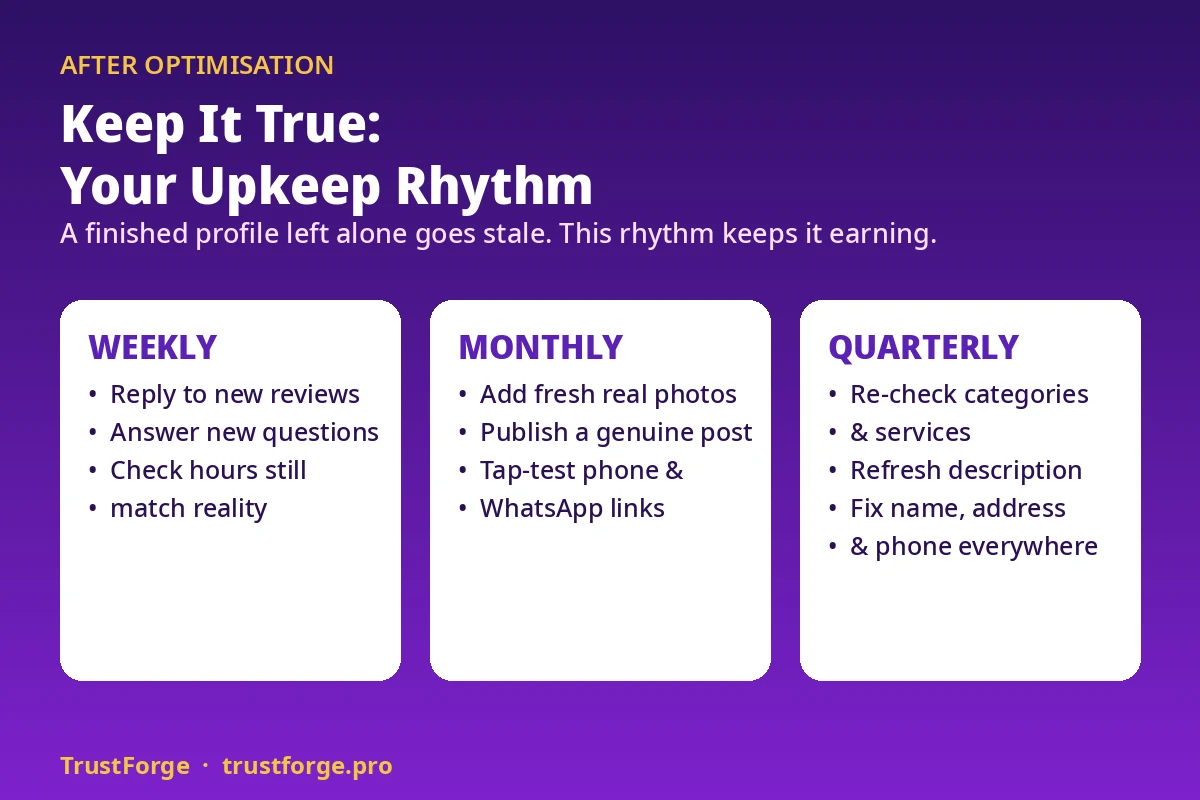
- Weekly: reply to new reviews and questions; check hours still match reality.
- Monthly: add fresh photos; publish a post about something genuinely new; re-check phone, WhatsApp and website links by tapping them yourself.
- Quarterly: re-read your categories, services and description against what your business actually offers today, and correct your main directory listings so name, address and phone stay identical everywhere.
Frequently asked questions
How long does optimisation take to show results?
Completing and correcting a profile can improve how trustworthy and complete your listing looks as soon as Google approves the changes, but movement in competitive searches usually builds over weeks and months as reviews, photos and accurate information accumulate. Anyone promising a specific position by a specific date is guessing.
Is a Google Business Profile really free?
Yes. Claiming, verifying and completing the profile costs nothing. Businesses pay an agency for the time, order and follow-through — doing every field properly, in both languages, and keeping it maintained — not for access to the profile itself.
My business has no shop or office. Can I still have a profile?
Yes. Businesses that serve customers at their location can hide their address and set service areas instead, competing for the areas they genuinely cover.
Should I add keywords to my business name to rank faster?
No. Use your real signboard name. Keyword-stuffed names risk Google changing or penalising the listing, and they undermine trust when the name on Google does not match the name on your building.
The short version
How to optimise Google Business Profile comes down to this: claim it, name it truthfully, categorise it correctly, pin it accurately, keep one consistent phone number, publish hours you actually keep, describe it in Arabic and English, list every service, show real photos, and answer your reviews and questions. Do all of that, and keep it true, and your profile can compete with businesses far bigger than yours.
If you would like a second pair of eyes on your own profile, start with a free local SEO audit: one page, your real numbers against the top businesses near you, and the fixes in the order we would do them. You can also reach us on WhatsApp at +966 57 8581 358.